
Working between rides is easier with a stable laptop surface that fits your vehicle, keeps your computer within reach, and stores away when passengers need the space. The right mount can turn a parked car into a more practical mobile office without permanent installation.
We selected 10 car laptop mounts for rideshare drivers, ranging from compact steering-wheel trays to full-motion passenger-seat systems. The guide below explains the key differences so you can choose a setup that matches your laptop, vehicle, and work style.
Best 10 Car Laptop Mounts for Rideshare Drivers Picks for 2026
Portable Pick
Adjustable Steering Wheel Laptop Tray

- Five-position height adjustment
- Steering-wheel and desktop modes
- Foldable 13.44-ounce design
Best For: Occasional in-car laptop or tablet use
Fleet-Ready Choice
RAM No-Drill Universal Laptop Mount

- Uses existing passenger-seat bolts
- Shock- and vibration-damping mount
- Lifetime warranty
Best For: Fleet and personal vehicles needing a dedicated workstation
Heavy-Duty Adjustable
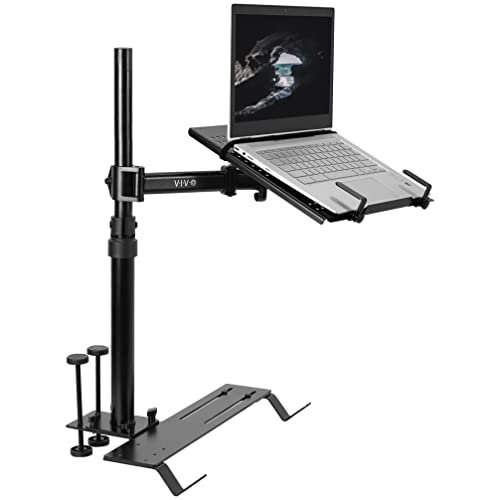
- Holds up to 17-inch, 11-pound devices
- Full tilt, swivel, rotation, and height adjustment
- Quick disconnect for passenger access
Best For: Larger laptops and stable, adjustable in-car work
Cooling Workstation
MELIPRON No-Drill Laptop Mount

- Dual USB cooling fans
- 360-degree rotation and adjustment
- Quick-release seat-rail mounting
Best For: Extended mobile work and shared vehicles
Best Rotating Cup-Holder Desk

- 360° rotating, driver-conscious positioning
- Scratch-resistant birch surface
- Tool-free setup for round cup holders
Best For: Portable parked work and dining
Best Seat-Mounted Workstation
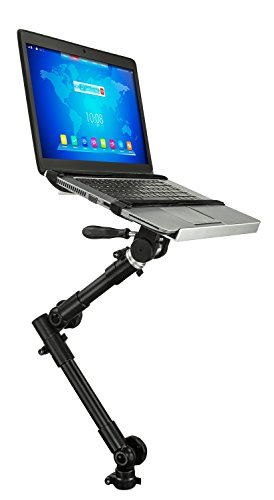
- Adjusts from 23 to 35 inches
- Supports laptops up to 15.4 inches and 9 pounds
- Vented tray with quick-release removal
Best For: Stable parked passenger-seat work
Best Budget Rotating Tray

- 360° rotating cup-holder design
- Foldable, tool-free setup
- Birch surface for laptops, meals, and drinks
Best For: Affordable portable parked use
Heavy-Duty Pick
Adjustable No-Drill Laptop Mount

- Supports 9–17-inch devices up to 11 lb
- Height, tilt, swivel, and arm adjustments
- Dual fans and detachable upper workstation
Best For: Longer parked work sessions and field-service tasks
Most Portable

- Tool-free installation in compatible cup holders
- Adjustable height and 360-degree rotation
- Surface handles laptops, meals, paperwork, and drinks
Best For: Quick work and meal breaks between rides
Simple Seat-Mount Pick
Full-Motion Laptop Vehicle Mount

- No-drill attachment to a compatible seat bar
- Adjustable height and viewing angle
- Locking tray with USB-powered cooling fan
Best For: Compatible vehicles and straightforward parked laptop use
Portable Pick – Adjustable Steering Wheel Laptop Tray
For rideshare drivers who need a compact option among car laptop mounts for rideshare drivers, this foldable steering-wheel tray offers a quick way to create a temporary work surface. Its five-position height adjustment and dual steering-wheel or desktop modes make it practical for short stops, travel, or in-car tasks.
Best For: Drivers who want a lightweight, portable tray for occasional laptop or tablet use.
Pros:
- Five-position height adjustment supports a more comfortable working height.
- Flips between steering-wheel and desktop stand modes.
- Foldable design includes a storage bag and weighs 13.44 ounces.
- Fits round steering wheels and supports a 10.8-by-13-inch work surface.
Cons:
- Designed for temporary use rather than a permanently installed workstation.
- Steering-wheel compatibility is specifically described for round wheels.
This is the most portable choice in the group. It suits drivers who prioritize easy storage and fast setup, though drivers needing a rigid, seat-mounted platform may prefer one of the heavier no-drill systems.
Fleet-Ready Choice – RAM No-Drill Universal Laptop Mount
The RAM MOUNTS Tough-Tray is a strong candidate for car laptop mounts for rideshare drivers who want a no-drill installation. It attaches using existing passenger-seat bolts and combines a universal base with a dual articulating arm for adjustable positioning.
Best For: Fleet, truck, or personal vehicles that need a durable, permanently available laptop workstation.
Pros:
- Installs without drilling or permanent vehicle modifications.
- Universal adjustable base is designed for cars, trucks, and fleet vehicles.
- Ball-and-socket system helps damp shock and vibration.
- Includes a dual articulating swing arm and lifetime warranty.
Cons:
- Installation depends on accessible passenger-seat bolts.
- The 18-by-12-by-12-inch assembly is less compact than a foldable tray.
Its no-drill design and lifetime warranty make it appealing for drivers who want a dedicated setup. Confirm the vehicle’s seat-bolt configuration and available passenger-space clearance before buying.
Heavy-Duty Adjustable – VIVO Single Laptop Car Mount
Among car laptop mounts for rideshare drivers, the VIVO MOUNT-CAR01 stands out for its broad adjustment range and substantial tray capacity. It anchors to exposed passenger-seat bolts, supports laptops up to 17 inches and 11 pounds, and disconnects when the passenger area is needed.
Best For: Drivers who want a sturdy, highly adjustable mount for larger laptops, tablets, or notebooks.
Pros:
- Supports devices up to 17 inches and 11 pounds.
- Offers tilt, swivel, rotation, and height adjustment.
- Telescopic pole adjusts from 18.5 to 26.3 inches.
- Ventilated tray and quick-disconnect mechanism add practical convenience.
Cons:
- Requires exposed floor seat bolts for installation.
- Its 11-pound weight makes it less portable than a simple tray.
This mount is best suited to drivers who value stability and positioning flexibility over portability. Check for compatible exposed seat bolts and consider the available passenger-side space before installation.
Cooling Workstation – MELIPRON No-Drill Laptop Mount
The MELIPRON is a practical choice among car laptop mounts for rideshare drivers who work for extended periods or use shared vehicles. It mounts to passenger-seat rail bolts without drilling, adds dual USB cooling fans, and uses a quick-release pole to help preserve passenger space.
Best For: Drivers and mobile professionals who need cooling, full adjustment, and quick removal.
Pros:
- Dual USB cooling fans help prevent laptop overheating.
- Provides height, tilt, and 360-degree rotation adjustment.
- No-drill seat-rail installation suits leased, fleet, and personal vehicles.
- Quick-release design helps maintain passenger space when not in use.
Cons:
- At 12 pounds, it is not intended as a lightweight portable stand.
- Installation requires compatible passenger-seat rail bolts.
- USB cooling fans require access to a USB power source.
This is the most feature-focused option for drivers who want cooling and full-motion positioning. Its two-year warranty and replacement-parts support add reassurance, but fitment should be confirmed before purchase.
Best Rotating Cup-Holder Desk – Birch Car Laptop Tray
For rideshare drivers comparing car laptop mounts for rideshare drivers, this rotating cup-holder tray offers a compact, tool-free workspace for parked breaks. Its birch surface supports a laptop, tablet, documents, or drinks, while the swivel design helps position the tray without blocking the driver’s view.
Best For: Drivers who want a portable, cup-holder-mounted work and dining surface for commuting, road trips, or parked work sessions.
Pros:
- 360-degree rotation helps with positioning and driver visibility.
- Birch desktop is scratch-resistant and rated for temperatures from -4°F to 140°F.
- Tool-free, three-step installation and slim storage pouch support portability.
- Magnetic stabilization and an aluminum frame fit round cup holders measuring 2.75 to 3.93 inches.
Cons:
- Not designed for square, movable, or detachable cup holders.
- The cup-holder base may be less suitable for heavier setups than a permanently installed mount.
This is a practical choice when portability matters more than a fixed workstation. Confirm your cup-holder shape and dimensions before ordering, and use the tray only when safely parked.
Best Seat-Mounted Workstation – Mount-It! Car Laptop Mount
Among car laptop mounts for rideshare drivers, the Mount-It! MI-7410 is the more substantial option for handling reports, scheduling, and other tasks from the parked passenger seat. Its adjustable arm and vented tray are designed for everyday laptops up to 15.4 inches and 9 pounds.
Best For: Rideshare drivers who need a stable, adjustable passenger-seat workstation between trips and do not mind basic installation with hand tools.
Pros:
- Height adjusts from 23 to 35 inches, with swivel and tilt adjustment.
- Supports 12- to 15.4-inch laptops up to 9 pounds.
- Vented tray promotes airflow during longer parked work sessions.
- Quick-release removal, Velcro straps, lifetime warranty, and US-based support add convenience.
Cons:
- Attaches to a front passenger-seat bolt and may require basic hand tools.
- Seat-bolt fit and airbag clearance must be checked before use.
- Notes specify use only while parked, not while driving.
This mount is better suited to drivers who prioritize adjustability and laptop support over instant installation. Check the vehicle fit, seat-bolt compatibility, and airbag zone carefully before setup.
Best Budget Rotating Tray – Foldable Wood Car Desk
This foldable wood tray is a straightforward option for drivers shopping for car laptop mounts for rideshare drivers without permanent installation. It combines a 360-degree rotating cup-holder table with a birch work surface for laptops, meals, drinks, or other essentials during parked breaks.
Best For: Budget-minded commuters and rideshare drivers seeking a lightweight, multipurpose tray for round cup holders.
Pros:
- 360-degree rotation helps keep items within reach without blocking the driver’s view.
- Birch construction is described as temperature-resistant and scratch-resistant.
- Tool-free, three-step installation and foldable storage make it easy to carry.
- Reinforced aluminum frame and magnetic lock fit round cup holders from 2.75 to 3.93 inches.
Cons:
- Not suitable for square or detachable cup holders.
- The listed 60-day return and exchange policy is shorter than a long-term warranty.
- Its tray format is intended for parked use rather than a dedicated driving workstation.
Choose this model for simple portability and multiple uses rather than heavy-duty mounting. Verify your vehicle’s cup-holder dimensions and keep work or dining activities to safe, parked periods.
Heavy-Duty Pick – Adjustable No-Drill Laptop Mount
For rideshare drivers who need a more structured workstation while parked, this no-drill mount offers a secure seat-mounted setup with broad adjustability. Its triangular base, multiple clamps, strap, and adjustable arms are designed to limit movement, but you should verify the passenger-seat bolt spacing and clearance before ordering.
Best For: Drivers and mobile workers who need a robust laptop mount for longer parked work sessions, reporting, diagnostics, or field service.
Pros:
- Supports 9–17-inch laptops and tablets up to 11 lb.
- Offers height, tilt, swivel, and articulating-arm adjustments.
- Built-in dual USB fans help improve airflow during extended parked use.
- Detachable upper workstation can reduce passenger-side obstruction when not needed.
Cons:
- Requires a compatible passenger-seat bolt setup and a 6.6–17-inch mounting span.
- Its 5.6 kg weight and steel base make it less convenient to move between vehicles.
- Not designed for hook-style seat mounts.
This is the most substantial option of the three, with a 2-year warranty and extensive positioning range. It is a strong fit when stability and adjustability matter more than quick portability.
Most Portable – Cup Holder Laptop Car Desk
This cup-holder car desk is a convenient choice for rideshare drivers who want a simple surface for a laptop, paperwork, meals, or drinks while parked. It installs without tools or drilling and fits standard round cup holders measuring 2.75–3.85 inches.
Best For: Drivers who prioritize quick setup, easy removal, and a versatile surface for short work or meal breaks.
Pros:
- Tool-free twist-lock installation makes it easy to move between vehicles.
- Height adjusts from 4.1–7 inches, with 360-degree rotation.
- Wood-grain composite surface is designed to resist heat, stains, and everyday wear.
- Fits many sedans, SUVs, and trucks with compatible round cup holders.
Cons:
- Compatibility depends on having a standard round cup holder in the stated size range.
- The notes do not specify a laptop weight capacity.
- It is intended for use while parked rather than as a driving workstation.
Unlike seat-mounted car laptop mounts for rideshare drivers, this model emphasizes portability and multipurpose use. It is a practical option for breaks, but drivers needing a dedicated secured laptop tray may prefer a seat-mounted design.
Simple Seat-Mount Pick – Full-Motion Laptop Vehicle Mount
This no-drill vehicle mount gives rideshare drivers a dedicated laptop tray that attaches to an exposed metal bar beneath the passenger seat. It provides adjustable height and angle, plus a USB-powered fan, but compatibility should be checked carefully because the vehicle needs the required exposed seat-post bar.
Best For: Drivers with a compatible car, truck, or van who want a straightforward seat-mounted laptop stand for parked use.
Pros:
- No drilling is required for installation on a compatible passenger seat.
- Full-motion adjustment allows changes to laptop height and angle.
- Locking teeth and L-brackets help hold the tray and laptop in place.
- Aircraft-grade aluminum and steel components are designed for daily use.
Cons:
- Requires an exposed metal bar beneath the passenger seat.
- Compatibility is listed for 12–15.4-inch laptops, a narrower range than some alternatives.
- The single USB-powered fan is less extensive than dual-fan designs.
With a lifetime warranty and a relatively straightforward feature set, this mount suits drivers who can confirm the seat fit and use a laptop within its stated size range. Its full-motion adjustment adds flexibility without requiring a drilled installation.
How We Picked These Car Laptop Mounts for Rideshare Drivers
We focused on mounts and trays designed for use inside cars, trucks, vans, and other passenger vehicles. Our comparison considers installation method, adjustability, laptop support, portability, stability, and how easily each design can be removed or repositioned. No-drill systems received particular attention because rideshare drivers often need a reversible setup that does not alter the vehicle.
We also separated simple steering-wheel desks from anchored passenger-seat mounts. A tray may be lighter and faster to deploy, while a seat-mounted system generally offers better positioning and more adjustability when you are parked and working for longer periods.
Quick Comparison
- Best for portability: Foldable steering-wheel trays are compact, easy to store, and usually the quickest option to set up.
- Best for stability: Passenger-seat and truck-style no-drill mounts typically provide a more secure platform than a loose tray.
- Best for adjustability: Full-motion systems let you change height, angle, and viewing position for a more comfortable parked-work setup.
- Best for occasional use: Cup-holder tables and basic car desks offer a simple surface for a laptop, tablet, meals, or paperwork.
Key Buying Factors for Car Laptop Mounts for Rideshare Drivers
Vehicle Compatibility
Check how the mount attaches before buying. Steering-wheel trays require a compatible wheel shape and enough clearance, while seat-mounted models need suitable seat rails or a stable passenger-seat installation point. Confirm that the design will not interfere with pedals, airbags, controls, gear selectors, or passenger seating.
Laptop Size and Weight
Match the platform dimensions and stated capacity to your computer. Larger 15-inch laptops may need a wider tray, while heavier models benefit from a reinforced mount and stronger support. A tablet or compact Chromebook may work well with a smaller, lighter design.
Stability and Adjustability
Look for retaining edges, adjustable supports, locking joints, and a broad base. Height and tilt adjustment can reduce glare and improve viewing comfort, but extra moving parts may require tighter setup and more careful locking.
Storage and Passenger Access
Rideshare interiors need to transition quickly between work and passenger service. Choose a foldable or removable model if you regularly carry riders. The mount should stow securely without blocking footwells, seats, visibility, or emergency access.
Safe Use
Use laptop mounts only while parked. Do not operate a computer while driving, and never position a tray where it can obstruct the steering wheel, dashboard, windshield, airbags, or driver controls.
Who Should Buy Which Car Laptop Mounts for Rideshare Drivers?
Choose a steering-wheel tray if you want the lowest-cost, most portable option for short work sessions while parked. Choose a passenger-seat or no-drill vehicle mount if you need a more dedicated workstation and expect to use a laptop frequently between rides. Choose a heavy-duty truck-style design for larger laptops, demanding daily use, or vehicles where extra support matters. Choose a rotating cup-holder table if you want a multipurpose surface for a laptop, tablet, food, or paperwork and value quick removal over maximum stability.
Before ordering, measure your laptop, inspect the available mounting area, and consider how often you will need to clear the vehicle for passengers. The best option is the one that stays stable when parked, fits your equipment, and can be removed or repositioned without slowing down your driving routine.