
Working from a parked vehicle is easier with a stable laptop platform that keeps your computer supported, visible, and within comfortable reach. The right mount can turn a car, truck, van, or SUV into a more practical mobile workstation without permanent installation.
These 10 picks cover no-drill stands, passenger-seat mounts, steering-wheel trays, cup-holder designs, and heavy-duty work platforms. Compare fit, adjustment range, stability, and portability before choosing the setup that best matches your vehicle and work style.
Best 10 Car Laptop Mounts for Dashboards Picks for 2026
Best Overall
RAM MOUNTS No-Drill Tough-Tray

- No-drill installation using passenger-seat bolts
- Fits 10- to 16-inch laptops
- Lifetime warranty with vibration-damping mount
Best For: Fleet vehicles and durable in-car laptop workstations
Best Adjustable Fit
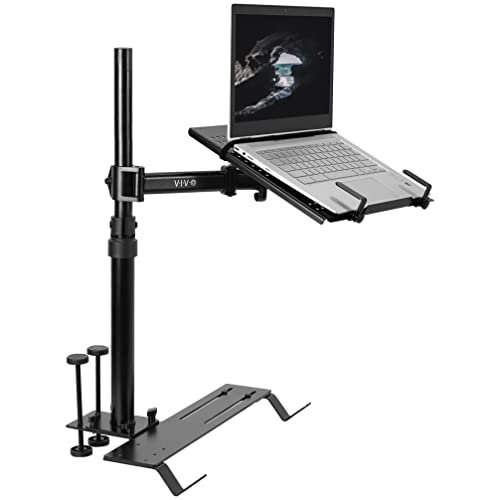
- Supports laptops up to 17 inches and 11 pounds
- Three mounting-foot sets improve vehicle compatibility
- Full adjustment plus quick disconnect
Best For: Multi-vehicle users needing flexible positioning
Best Cooling Features
MELIPRON Heavy-Duty Laptop Mount

- Built-in dual USB cooling fans
- No-drill seat-rail installation
- 360-degree swivel and quick-release pole
Best For: Technicians and contractors working from vehicles
Best Lightweight Option

- Tool-free installation in 2.6- to 3.3-inch cup holders
- 15 x 10.2-inch surface with cup recesses
- Weighs 4.4 pounds and includes storage bag
Best For: Occasional work, meals, and portable vehicle use
Heavy-Duty Seat-Bolt Workstation
Adjustable Aluminum Laptop Stand

- Fits 10- to 13-inch laptops and tablets
- 360° rotation and 180° tilt adjustment
- Supports up to 15 pounds without drilling
Best For: Parked passenger-seat laptop work in cars, vans, SUVs, and trucks
Professional Passenger-Seat Mount
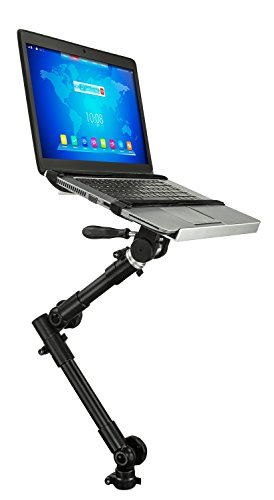
- Fits laptops up to 15.4 inches and 9 pounds
- Quick-release tray with adjustable swivel arm
- Vented tray and straps help manage heat and movement
Best For: Parked mobile work with standard-size laptops
Portable Steering-Wheel Desk
Foldable Adjustable Laptop Tray

- Quick, tool-free steering-wheel installation
- Height-adjustable design supports eye-level viewing
- Folds compactly and includes a storage bag
Best For: Portable parked workstations for cars, trucks, SUVs, and motorhomes
Best No-Drill Seat-Rail Support
Adjustable Mount-It! Laptop Stand
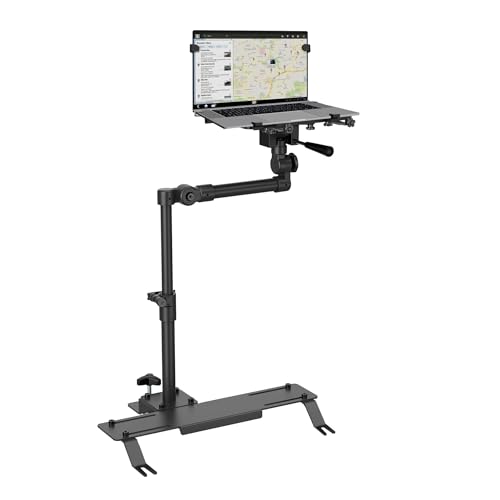
- Multi-bolt base with leveling foot
- Adjustable, ventilated tray for devices up to 17 inches
- Lifetime warranty and US-based support
Best For: Parked mobile work in cars, vans, and trucks
Best Heavy-Duty Pick

- Five-position height adjustment
- Steering-wheel and desktop modes
- Lightweight, foldable aluminum design
Best For: Temporary work sessions and frequent travel
Best Heavy-Duty Fleet Setup
SPIRRELAB Laptop Mount with Fans

- Three-point no-drill base with clamps and strap
- Dual USB fans and support up to 11 pounds
- Detachable workstation with broad adjustment range
Best For: Fleet, truck, van, and mobile service work
Best Overall – RAM MOUNTS No-Drill Tough-Tray
For drivers comparing car laptop mounts for dashboards and vehicle workstations, the RAM MOUNTS Tough-Tray is a durable no-drill option that attaches using existing passenger-seat bolts. Its adjustable platform and articulated arm are designed for laptops from 10 to 16 inches.
Best For: Fleet vehicles, trucks, and drivers who want a long-term, professionally built laptop workstation.
Pros:
- No drilling or permanent vehicle modifications required
- Adjustable tray accommodates 10- to 16-inch laptops
- Ball-and-socket system helps damp shock and vibration
- Lifetime warranty and dual articulating swing arm
Cons:
- Installation requires accessible passenger-seat bolts
- Its 18 x 12 x 12-inch assembly may take up substantial cabin space
The RAM MOUNTS model is a strong choice when stability, adjustability, and long-term durability matter more than a compact setup. Its no-drill design also suits leased or shared vehicles.
Best Adjustable Fit – VIVO Single Laptop Car Mount
The VIVO MOUNT-CAR01 is a flexible option among car laptop mounts for dashboards, although it anchors to passenger-seat bolts rather than the dashboard itself. Its adjustable height, tilt, swivel, and rotation help accommodate different seating positions and vehicle layouts.
Best For: Drivers of cars, trucks, vans, and SUVs who need broad adjustment and support for larger laptops.
Pros:
- Supports laptops up to 17 inches and 11 pounds
- Includes three mounting-foot sets for different seat-bolt styles
- Offers height, tilt, swivel, and rotation adjustments
- Quick-disconnect design can return the passenger area to normal use
Cons:
- Requires exposed passenger-seat bolts
- The 11-pound stand is relatively heavy to move between vehicles
With a ventilated tray, flexible mounting feet, and a telescoping pole, the VIVO is especially useful when ergonomic positioning and vehicle compatibility are priorities.
Best Cooling Features – MELIPRON Heavy-Duty Laptop Mount
The MELIPRON is a heavy-duty seat-rail workstation for shoppers considering car laptop mounts for dashboards without drilling into the vehicle. It combines an aluminum-and-steel build with dual USB cooling fans, adjustable positioning, and a quick-release telescopic pole.
Best For: Technicians, contractors, and fleet users who run laptops for extended periods in demanding vehicle environments.
Pros:
- Dual USB cooling fans help prevent laptop overheating
- No-drill installation attaches to passenger-seat rail bolts
- Height, tilt, and 360-degree swivel adjustments support ergonomic use
- Quick release helps preserve passenger space when removed
Cons:
- At 12 pounds, it is not a lightweight portable stand
- Fit depends on compatible passenger-seat rail bolts
The MELIPRON stands out for active cooling and rugged construction. Its quick-release design is practical for shared vehicles, while the two-year warranty and replacement-parts support add reassurance.
Best Lightweight Option – TREXON Swivel Car Desk Tray
The TREXON is a compact alternative for shoppers browsing car laptop mounts for dashboards and portable vehicle work surfaces. Rather than using seat bolts, its adjustable base fits standard round cup holders, creating a tool-free tray for laptops, tablets, meals, or drinks.
Best For: Occasional laptop use, road meals, and drivers who want a lightweight setup that is easy to remove and store.
Pros:
- Tool-free cup-holder installation for most cars, trucks, and SUVs
- 15 x 10.2-inch work surface with two cup recesses
- 360-degree swivel and adjustable height
- Includes non-slip mat and storage bag
Cons:
- Compatibility depends on a round cup holder measuring 2.6 to 3.3 inches
- Cup-holder mounting may provide less anchoring than seat-bolt systems
- Designed as a general tray rather than a dedicated laptop enclosure
At 4.4 pounds, the TREXON is the easiest option here to pack away or move between vehicles. It makes sense for short work sessions and meals where convenience matters more than a permanent workstation.
Heavy-Duty Seat-Bolt Workstation – Adjustable Aluminum Laptop Stand
For shoppers comparing car laptop mounts for dashboards, the AA-Products T-100AP is a seat-bolt-mounted alternative designed for trucks, vans, SUVs, sedans, and other automobiles. Its tray fits 10- to 13-inch laptops and tablets, while the adjustable arm helps you position the screen and keyboard for parked work sessions.
Best For: Drivers who need a sturdy, adjustable laptop or tablet stand for a passenger-seat workspace.
Pros:
- Fits 10- to 13-inch laptops, tablets, and ultrabooks.
- 360-degree tray rotation and 180-degree tilt provide flexible positioning.
- Telescopic height adjustment spans 24 to 36 inches.
- Mounts to a passenger seat bolt without drilling and supports up to 15 pounds.
Cons:
- Designed for seat-bolt installation rather than direct dashboard mounting.
- The tray is limited to laptops with screens between 10 and 13 inches.
- Use requires suitable passenger-seat bolt access and installation space.
The T-100AP stands out for its high stated weight capacity, broad height range, and extensive angle adjustment. It is a practical choice when stability and positioning matter more than a compact, dashboard-style setup.
Professional Passenger-Seat Mount – 12–15.4-Inch Laptop Stand
Among car laptop mounts for dashboards, the Mount-It! MI-7410 offers a no-drill passenger-seat workstation for parked use. It is sized for common 12- to 15.4-inch laptops, with a telescoping arm, adjustable tray, quick-release lever, and straps intended to reduce movement.
Best For: Mobile professionals who need a removable workspace for reports, scheduling, or other laptop tasks while parked.
Pros:
- Accommodates 12- to 15.4-inch laptops weighing up to 9 pounds.
- Height adjusts from 23 to 35 inches with swivel and tilt positioning.
- Quick-release tray detaches in seconds when the passenger seat is needed.
- Vented tray and integrated hook-and-loop straps support airflow and stability.
Cons:
- Attaches to the front passenger seat bolt, not directly to the dashboard.
- Installation may require basic hand tools and included link brackets.
- It should be used only while parked, with airbag clearance checked first.
This model balances laptop compatibility with convenient removal and useful positioning adjustments. Its lifetime manufacturer warranty and US-based support add reassurance, but buyers should verify seat-bolt fit and maintain clearance from the airbag zone.
Portable Steering-Wheel Desk – Foldable Adjustable Laptop Tray
If you want car laptop mounts for dashboards but prefer a compact setup, this steering-wheel tray creates a temporary car desk without tools or seat-bolt installation. Its height-adjustable design, padded rotating hooks, and foldable aluminum construction make it easy to set up, remove, and store.
Best For: Travelers and drivers who want a portable laptop or tablet workspace for a parked car, truck, SUV, Tesla, or motorhome.
Pros:
- Hangs on the steering wheel and sets up quickly without complicated assembly.
- Height adjustment can raise the screen toward eye level for a more comfortable viewing position.
- Foldable design fits in a glove box, door pocket, or briefcase.
- Silicone-padded contact areas help protect the steering wheel and device.
Cons:
- It is a steering-wheel hanging mount rather than a dashboard-mounted stand.
- The supplied notes do not specify laptop size or maximum weight limits.
- It must be installed and used while the vehicle is stationary.
This tray is the most portable option in the group, especially for users who value quick setup and compact storage. Its unspecified laptop capacity means buyers should confirm device fit and stability before relying on it for heavier computers.
Best No-Drill Seat-Rail Support – Adjustable Mount-It! Laptop Stand
For shoppers comparing car laptop mounts for dashboards, the Mount-It! MI-528 is a seat-mounted alternative that avoids drilling into the vehicle. Its multi-bolt base, leveling foot, adjustable pole, and ventilated tray are designed for parked work in cars, vans, and trucks.
Best For: Field technicians, delivery drivers, sales reps, and fleet users who want a stable passenger-side workstation.
Pros:
- Multi-point base uses the seat rail, up to eight bolts, and a leveling foot for added stability.
- Adjusts from 10.6 to 18.4 inches with 90° tilt and 90° swivel.
- Ventilated tray and extendable side grips support laptops and full-size tablets up to 17 inches.
- Includes a lifetime manufacturer warranty, printed instructions, video guidance, and US-based support.
Cons:
- Supports up to 6.6 pounds, so heavier devices may exceed its rating.
- Buyers must confirm accessible seat bolts and the correct vertical, horizontal, or angled bracket fit.
- It is not water resistant.
The MI-528 is a strong choice when stability and long-term support matter more than portability. Its seat-rail installation keeps the dashboard clear, but compatibility should be checked carefully before ordering.
Best Heavy-Duty Pick – Foldable Car Laptop Tray
Among car laptop mounts for dashboards, this compact steering-wheel tray stands out for portability rather than permanent installation. It has five-position height adjustment, folds for storage, and switches between steering-wheel and desktop modes for short parked work sessions.
Best For: Frequent travelers and drivers who need a lightweight, temporary laptop or tablet workstation.
Pros:
- Five-position height adjustment helps tailor the working position.
- Flips between steering-wheel use and desktop stand mode without disassembly.
- Foldable aluminum design weighs 13.44 ounces and includes a storage bag.
- 10.8-by-13-inch surface supports laptops, iPads, and similar devices.
Cons:
- Designed for round steering wheels, so fit may vary with a vehicle’s wheel shape.
- Its compact tray is less substantial than a bolted seat-mount workstation.
- The supplied notes do not specify a maximum device weight.
This tray is convenient when you want something easy to carry and store between trips. It is best suited to temporary parked use rather than a permanently installed, heavy-duty setup.
Best Heavy-Duty Fleet Setup – SPIRRELAB Laptop Mount with Fans
For buyers seeking car laptop mounts for dashboards but needing a more rugged workstation, the SPIRRELAB mount uses a no-drill passenger-seat installation. Its three-point base, articulating arms, cooling fans, and detachable upper section suit parked diagnostics and field-service work.
Best For: Fleet operations, mobile technicians, and truck or van users working with heavier laptops.
Pros:
- Triangular three-point base, adjustable clamps, and a 59-inch strap help limit movement.
- Height adjusts from 11.9 to 20 inches, with tilt, 360° swivel, and up to 13 inches of arm reach.
- Dual USB cooling fans support extended parked work, while the tray fits 9- to 17-inch devices up to 11 pounds.
- Detachable upper workstation reduces passenger-side obstruction when the mount is not in use.
Cons:
- At 5.6 kg, the mount itself is relatively heavy.
- Fit requires passenger-seat bolts, a 6.6- to 17-inch mounting span, and adequate clearance; it does not fit hook-style mounts.
- Coverage is a two-year limited manufacturer warranty.
The SPIRRELAB offers the strongest capacity and most extensive adjustment range of these options, making it appropriate for demanding mobile work. Its heavier construction and fit-check requirements are trade-offs for that added capability.
How We Picked These Car Laptop Mounts for Dashboards
We selected these mounts based on the features that matter most for mobile computing: installation method, laptop compatibility, weight capacity, adjustability, stability, portability, and the amount of workspace provided. The list includes options for occasional use as well as heavier-duty stands designed for frequent work in trucks, vans, and cars.
Because vehicle interiors vary widely, we also considered mounting location. Passenger-seat platforms can offer better writing space, steering-wheel trays are highly portable, and floor- or seat-supported designs may provide more stability than a simple lap desk. Always confirm the manufacturer’s fit measurements before ordering.
Quick Comparison
- Best for broad compatibility: RAM MOUNTS Tough-Tray designs offer a flexible platform for different laptop sizes.
- Best for heavier equipment: VIVO, MELIPRON, and AA-Products options emphasize stronger support for mobile workstations.
- Best for occasional use: TREXON and foldable steering-wheel trays are convenient for short work sessions or meals.
- Best for larger laptops: The Mount-It! model rated for 17-inch laptops is the better starting point for oversized computers.
- Best for passenger-seat use: Mount-It! no-drill stands keep the work surface positioned in front of the passenger seat.
Key Buying Factors for Car Laptop Mounts for Dashboards
Mounting Method and Vehicle Fit
Check whether the mount attaches to a seat rail, floor area, cup holder, steering wheel, or another support point. No-drill models are easier to install and remove, but they still need compatible clearance around the seat, console, pedals, and dashboard.
Laptop Size and Weight
Measure your laptop’s width and depth, including any case, and compare those dimensions with the tray’s usable surface. Do not rely only on screen size. Weight ratings should include accessories such as a charger, docking device, or external drive.
Adjustability and Viewing Comfort
Look for height, tilt, swivel, and horizontal adjustment when you need to position the screen precisely. A mount that places the laptop too low or too close can create neck and wrist strain during longer sessions.
Stability and Safety
Choose a design with a secure base, raised edges, retaining arms, or straps when available. These products are intended for use while parked; never operate a laptop or adjust a mount while driving, and keep the setup clear of airbags, controls, and the driver’s view.
Who Should Buy Which Car Laptop Mounts for Dashboards?
Choose a heavy-duty, seat- or floor-supported stand if you work from your vehicle regularly or use a larger laptop. A no-drill passenger-seat model suits professionals who want a repeatable workstation without permanent modifications. Steering-wheel trays are best for compact, portable setups and short sessions when the vehicle is safely parked. If you need flexibility for different devices, prioritize a wide adjustable tray with secure retention. For occasional meals, paperwork, or light laptop use, a simple foldable or cup-holder-supported table may be sufficient.