
The best car GPS devices with digital displays make essential information easier to see without forcing you to look down at a phone. This roundup includes full GPS navigators, windshield or dashboard HUDs, and multifunction displays with speed, route, and driver-alert features.
Use the guide below to compare screen types, installation methods, navigation capabilities, visibility, and value so you can choose a device that fits your vehicle and driving habits.
Best 10 Car Gps Devices with Digital Displays Picks for 2026
Large-Screen Safety HUD
SinoTrack 5.5-Inch GPS Speedometer

- Large display shows speed, trip data, direction, and satellites
- Overspeed and fatigue-driving alerts
- Automatic brightness adjustment
Best For: Drivers wanting a dedicated, large-format speed display
Classic Navigation Display
Garmin nüvi 65LM GPS Navigator

- Bright 6-inch dual-orientation display
- Lane Assist and Junction View
- Spoken turn-by-turn Garmin Real Voice directions
Best For: Drivers seeking a standalone navigator with clear route guidance
Multifunction OBD Gauge
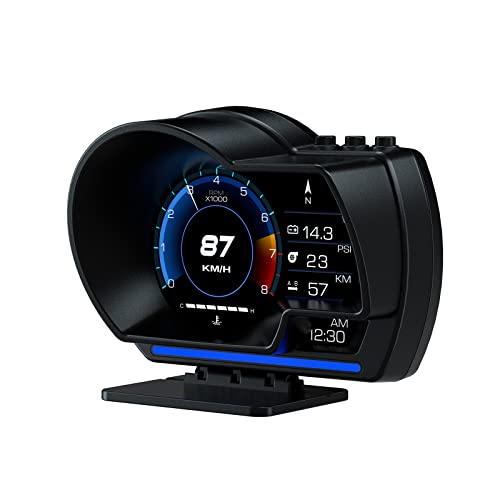
- OBD2 and GPS dual-mode operation
- Displays speed plus multiple vehicle metrics
- 10 interfaces with dashboard or windshield mounting
Best For: Drivers wanting speed and expanded vehicle diagnostics
Easy-View Route Navigator

- High-resolution 5-inch glass touchscreen
- Spoken directions and driver alerts
- North America maps with travel and park information
Best For: Drivers wanting simple touchscreen navigation and route alerts
GPS DVR Speed Display
3-in-1 GPS HUD and Dash Camera
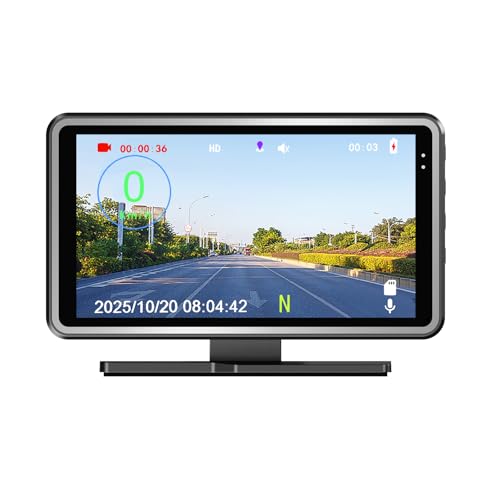
- Real-time MPH/KM/H speed display
- Automatic driving-video recording
- Map replay with speed and route history
Best For: Drivers wanting speed display, dash recording, and trip tracking together
Garmin Navigation Display
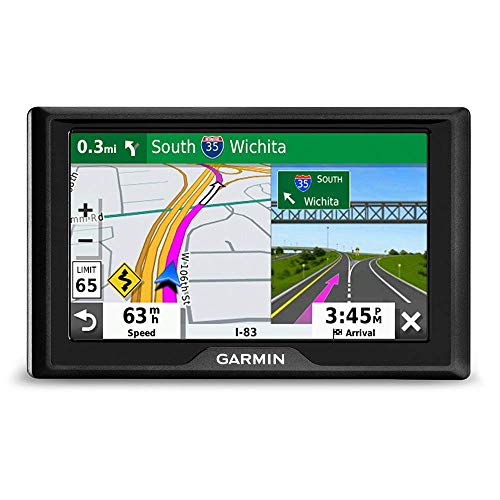
- 5-inch color touchscreen
- U.S. and Canada map updates
- Built-in Garmin Traffic and POIs
Best For: Drivers seeking dedicated, smartphone-free GPS navigation
VJOYCAR Speed HUD

- Large real-time green speed display
- 10 Hz GPS chipset for responsive updates
- USB plug-and-play installation
Best For: Drivers wanting a simple automatic GPS speedometer
Solar Multifunction HUD

- Large LCD shows speed, time, temperature, and altitude
- Solar and USB power options with built-in battery
- Overspeed alarm and fatigue-driving reminder
Best For: Drivers wanting a solar-assisted HUD with multiple readings
High-Refresh GPS HUD

- Dual GPS+BDS positioning with 10Hz refresh
- Large projected MPH speed readout
- USB plug-and-play with automatic brightness
Best For: Drivers wanting a simple, prominent windshield speed display
Universal Safety HUD
GPS Speedometer with Safety Alerts
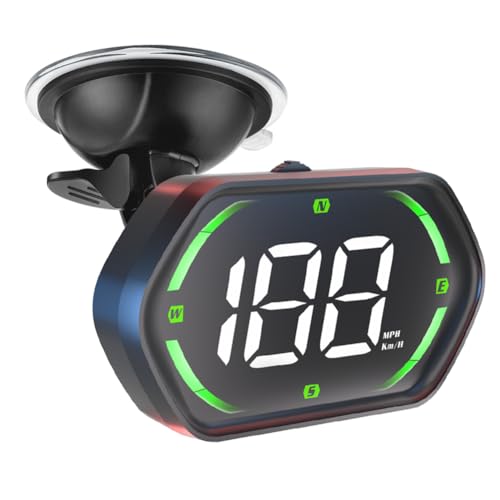
- MPH/KMH display with large LED font and auto-brightness
- Overspeed warning and four-hour fatigue reminder
- USB plug-and-play design with compass function
Best For: Drivers wanting a versatile HUD for cars, trucks, motorcycles, or golf carts
Large-Screen Safety HUD – SinoTrack 5.5-Inch GPS Speedometer
For drivers comparing car gps devices with digital displays, the SinoTrack stands out as a dedicated heads-up speedometer with a large 5.5-inch screen. It shows speed, driving time, mileage, time, direction, and satellite information, while automatic brightness adjustment helps keep the display readable in varying light.
Best For: Drivers who want a large, dedicated GPS speed display with overspeed and fatigue-driving reminders.
Pros:
- Large screen presents speed and several trip details at once.
- Overspeed and four-hour fatigue-driving alerts add useful reminders.
- Automatic brightness adjustment supports daytime and nighttime viewing.
- One-button controls allow quick display and setting changes.
Cons:
- It displays current trip mileage but cannot retain or accumulate distance when powered off.
- Requires a 5V power supply; higher voltage must not be used.
- Provides display information rather than turn-by-turn navigation.
The SinoTrack is a practical choice when readable speed and trip data matter more than route guidance. Its large display and safety alerts make it particularly useful for drivers seeking a focused dashboard companion.
Classic Navigation Display – Garmin nüvi 65LM GPS Navigator
The Garmin nüvi 65LM is a traditional navigation option among car gps devices with digital displays, combining a bright 6-inch dual-orientation screen with preloaded North America maps and spoken turn-by-turn directions. Its lane guidance and junction view are designed to make complicated exits easier to follow.
Best For: Drivers who want a dedicated GPS navigator with a large screen, voice guidance, and lane assistance.
Pros:
- Bright 6-inch display supports landscape or portrait orientation.
- Lane Assist with Junction View helps clarify complex interchanges.
- Spoken directions use Garmin Real Voice technology.
- Up Ahead places useful food and fuel information near the route.
Cons:
- Its resistive touchscreen is an older display style.
- The listed battery life is approximately one hour.
- School-zone warnings may not suit every driving route.
With its larger screen and straightforward navigation features, the nüvi 65LM remains a sensible fit for drivers who prefer a standalone GPS over phone-based directions. Lane guidance is its strongest advantage for route clarity.
Multifunction OBD Gauge – wiiyii P6 OBD2 GPS HUD
For shoppers evaluating car gps devices with digital displays, the wiiyii P6 combines GPS with OBD2 vehicle data in a compact head-up display. Depending on vehicle compatibility, it can show speed alongside information such as voltage, fuel consumption, RPM, and water temperature, with multiple interface views.
Best For: Drivers who want speed display plus additional vehicle data and a flexible dashboard or windshield installation.
Pros:
- Dual OBD2 and GPS modes provide broader data coverage.
- Can display speed, voltage, fuel consumption, RPM, and water temperature.
- Offers 10 interfaces and two installation options.
- Ambient lighting changes from blue to red for abnormal driving conditions such as speeding.
Cons:
- OBD features depend on the vehicle supporting the OBD2 protocol.
- Vehicles without compatible OBD2 use GPS functionality only.
- Its many data screens may be more than some drivers need.
The P6 is best viewed as a multifunction gauge rather than a navigation unit. Its dual-mode design is appealing for drivers who want both a visible speed readout and deeper vehicle information in one display.
Easy-View Route Navigator – Garmin Drive 53 GPS Navigator
The renewed Garmin Drive 53 is a straightforward choice among car gps devices with digital displays, pairing a high-resolution 5-inch glass touchscreen with simple menus, North America map updates, and spoken directions. Driver alerts for school zones, speed changes, and sharp curves add situational information during a trip.
Best For: Drivers who prefer a modern touchscreen navigator with clear maps, voice guidance, and route-related alerts.
Pros:
- High-resolution glass capacitive touchscreen is designed for easy map viewing.
- Provides spoken turn-by-turn directions with Garmin Real Directions.
- Alerts can cover school zones, speed changes, and sharp curves.
- Includes North America maps, Tripadvisor ratings, and national park directory information.
Cons:
- This renewed unit includes a listed 90-day limited warranty.
- It is a GPS navigator, not a multifunction vehicle-data gauge.
- Listed battery life is approximately one hour.
The Drive 53 is a good match for drivers prioritizing readable maps and uncomplicated route guidance. Its alerts and travel information add value, while the renewed designation makes warranty coverage an important purchase consideration.
GPS DVR Speed Display – 3-in-1 GPS HUD and Dash Camera
For drivers comparing car gps devices with digital displays, this 3-in-1 unit combines a real-time GPS speed readout with dash-camera recording and map-based trip replay. It supports MPH or KM/H, includes an overspeed alert, and is designed for plug-and-play use in 12V vehicles.
Best For: Drivers who want digital speed information plus driving video and route-history features in one compact device.
Pros:
- Displays GPS-based speed, date, time, compass, and location data.
- Records driving video automatically when powered on.
- Replays video with speed and movement history on a map.
- Includes a 16GB TF card, car adapter, and USB cable.
Cons:
- Its 3.15-inch overall device height and compact display may provide less viewing area than a dedicated navigation screen.
- Designed for 12V vehicles, so compatibility should be checked before purchase.
This is the most feature-packed option here for buyers who want a digital speed display with recording and trip replay rather than navigation alone. Its included accessories make setup straightforward.
Garmin Navigation Display – Drive 52 5-Inch GPS Navigator
Garmin Drive 52, GPS Navigator with 5” Display, Simple On-Screen Menus and Easy-to-See Maps
Check Price On AmazonThe Garmin Drive 52 is a traditional navigation-focused choice among car gps devices with digital displays. Its 5-inch touchscreen provides bright maps, simple menus, U.S. and Canada map updates, and built-in Garmin Traffic without requiring a smartphone.
Best For: Drivers who prioritize turn-by-turn navigation, a larger touchscreen, and built-in points of interest over vehicle speed monitoring.
Pros:
- 5-inch color touchscreen with easy-to-see maps.
- Includes detailed map updates for the U.S. and Canada.
- Provides Garmin Traffic without smartphone use.
- Adds driver alerts, TripAdvisor ratings, Foursquare points of interest, and travel databases.
Cons:
- This is a navigation unit, not a dedicated real-time digital speedometer.
- Its resistive touchscreen and 480-by-272 resolution are more basic than newer smartphone-style displays.
- Traffic and navigation functionality depend on the included device and its supported features rather than smartphone connectivity.
Choose the Drive 52 when map guidance is the main requirement. Its larger display and navigation databases make it more suitable for route planning than the speed-focused HUD models in this roundup.
VJOYCAR Speed HUD – G20 Green GPS Speedometer
For a simple, speed-focused option among car gps devices with digital displays, the VJOYCAR G20 shows real-time GPS speed in large green characters. It connects by USB, requires no buttons or setup, and can work across many vehicle types without using the engine, OBD port, or internal battery.
Best For: Drivers who want an easy-to-read GPS speed display with automatic operation and minimal installation.
Pros:
- Uses a stated 10 Hz chipset for fast speed updates.
- Plug-and-play USB installation with automatic on/off operation.
- Works independently of the vehicle engine and OBD port.
- Suitable for a wide range of vehicles, including cars, trucks, motorcycles, boats, and bikes.
Cons:
- Requires 10–30 seconds to acquire a GPS signal during first use.
- Cannot operate indoors, in underground parking, or in tunnels.
- USB power adapter may be needed if the vehicle lacks a USB port.
The G20 is a focused solution rather than a navigation or recording system. Its automatic operation and large speed display suit buyers who want straightforward GPS-based speed information without modifying the vehicle.
Solar Multifunction HUD – Solar GPS Digital Speedometer
For drivers comparing car gps devices with digital displays, this solar-powered HUD combines a large LCD readout with useful vehicle information. It shows speed, time, temperature, and altitude while offering adjustable speed compensation and USB backup power.
Best For: Drivers who want a solar-assisted display with multiple trip and vehicle readings.
Pros:
- Displays speed, time, temperature, and altitude on a large-font LCD screen.
- Supports both solar charging and USB power through its built-in battery.
- Includes overspeed and fatigue-driving reminders with adjustable settings.
- Automatic brightness recognition helps the screen remain visible day and night.
Cons:
- The display relies on GPS positioning, so conditions affecting satellite reception may influence readings.
- Its extra information and alerts may be more than drivers who want a basic speed display need.
This is a versatile choice for a dashboard or windshield setup, particularly if reduced reliance on a power cable matters. Its combination of solar charging, readable numbers, and safety reminders gives it broader functionality than a speed-only unit.
High-Refresh GPS HUD – 10Hz Windshield Speed Display
Among car gps devices with digital displays, this USB-powered HUD emphasizes quick GPS speed updates and direct windshield projection. Its large MPH readout, automatic brightness adjustment, and plug-and-play design make it a straightforward option for cars, trucks, and motorcycles with a USB port.
Best For: Drivers who prioritize a prominent projected speed readout and simple USB installation.
Pros:
- Uses dual-mode GPS and BDS positioning with a 10Hz refresh rate.
- Projects a large speed display into the driver’s line of sight.
- Automatically adjusts brightness for daytime and nighttime use.
- Requires no OBD connection and works with vehicles equipped with USB power.
Cons:
- GPS speed may deviate by approximately 0.6–1.8 MPH.
- Satellite reception can be affected in tunnels, underground garages, heavy rain, fog, or behind metallic windshield film.
- Displays speed in MPH by default, which may be less convenient for drivers who prefer KMH.
This model is best when speed visibility is the main goal. Its rapid refresh rate and automatic brightness are useful, but buyers should account for normal GPS limitations and confirm that their vehicle has a suitable USB port.
Universal Safety HUD – GPS Speedometer with Safety Alerts
This universal option stands out among car gps devices with digital displays by pairing GPS speed with overspeed and fatigue alerts. The USB plug-and-play unit supports MPH and KMH, adds a compass function, and is designed for vehicles ranging from cars and trucks to motorcycles and golf carts.
Best For: Drivers seeking broad vehicle compatibility plus speed, direction, and safety reminders.
Pros:
- Works with any vehicle that has a USB port, without wiring or OBD installation.
- Supports MPH and KMH with a large LED font and automatic brightness.
- Provides overspeed warnings and a fatigue reminder after four hours of continuous driving.
- Includes a compass function and accessories such as a Type-C cable, suction cup, and anti-slip pad.
Cons:
- GPS stability can be affected in tunnels, underground parking areas, rain, or fog.
- Requires a clear satellite signal for the most stable speed data.
- The supplied notes do not specify the unit’s full weight.
Choose this HUD if you want more than a digital speedometer and value flexible vehicle compatibility. The alert functions and compass add practical information, while the included mounting accessories simplify setup.
How We Picked These Car Gps Devices with Digital Displays
We focused on devices that display useful driving information clearly, including GPS speed, turn-by-turn directions, speed limits, overspeed warnings, and route guidance. The selection covers both dedicated navigators with map screens and compact head-up displays that project or show information near the driver’s line of sight.
We also considered installation, power requirements, display readability, alert functionality, map usability, and versatility. Because these products serve different purposes, the right choice depends on whether you want navigation, a more visible speed readout, or a combination of driving tools.
Quick Comparison
| Device type | Best for | Typical strengths |
|---|---|---|
| Dedicated GPS navigator | Turn-by-turn routing | Large maps, spoken directions, speed-limit information |
| GPS HUD speedometer | Simple speed visibility | Plug-and-play setup, large digits, overspeed alerts |
| OBD2 display | Vehicle data and speed | Direct vehicle connection and additional gauges |
| Multifunction HUD | Extra driving features | Speed, altitude, time, temperature, recording, or tracking |
Key Buying Factors for Car Gps Devices with Digital Displays
Navigation Versus Speed Display
A dedicated Garmin-style navigator is the better fit if you need visual maps, spoken directions, route planning, and speed-limit details. A compact GPS HUD is more appropriate when your phone or factory navigation already handles routing and you mainly want a large, glanceable speed reading.
Screen Visibility and Display Format
Look for large numerals, adjustable brightness, and a display position that does not block your view. Green or white LED text can be highly visible, while LCD screens may provide more information but require careful placement. A true projected HUD can reduce eye movement, although reflections and windshield angle affect performance.
Installation and Power
USB-powered models are generally quick to install and move between vehicles. OBD2 units use the vehicle’s diagnostic port and may offer additional data, but compatibility should be confirmed first. Solar-powered or wireless designs can reduce cable clutter, though charging and nighttime performance deserve attention.
Alerts and Accuracy
Overspeed and fatigue alerts can be useful reminders, but they should supplement—not replace—safe driving judgment. GPS speed readings may differ slightly from the vehicle speedometer, and navigation map coverage or update policies vary by model.
Who Should Buy Which Car Gps Devices with Digital Displays?
- Choose a dedicated GPS navigator if you want built-in maps, spoken directions, and a larger route display without relying on a phone.
- Choose a basic GPS HUD speedometer if your main priority is a prominent MPH or KMH readout with simple installation.
- Choose an OBD2 display if you want speed plus vehicle information and your car has a compatible diagnostic port.
- Choose a multifunction model if you value extras such as recording, GPS replay, altitude, temperature, or fatigue alerts.
Before buying, confirm the supported speed units, mounting method, power connection, map availability, and vehicle compatibility. The best option is the one that presents the information you actually need without adding distracting complexity.