
OTTOCAST ScreenFlow 11.4 review is for drivers who want a larger, more capable dashboard display without replacing the factory head unit.
It combines wireless CarPlay and Android Auto with streaming apps, split-screen use, and a bundled backup camera.
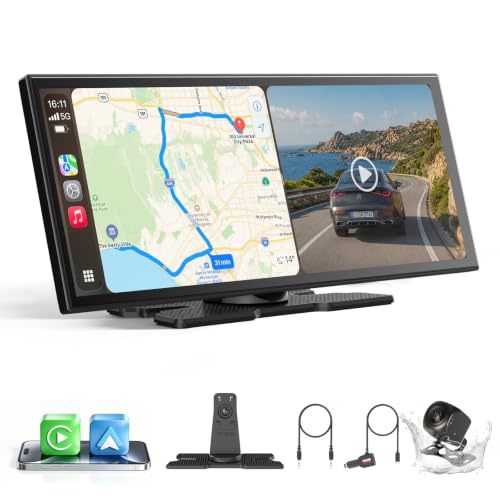
OTTOCAST ScreenFlow 11.4 Review Summary
The OTTOCAST ScreenFlow 11.4 makes sense for buyers who care about convenience first: a bigger touch display, wireless phone integration, and a cleaner path to added media features in a universal car screen format.
It is especially appealing for commuters, family vehicles, and road-trip drivers who want maps, music, and passenger entertainment in one unit rather than juggling a phone and factory infotainment limitations.
Verdict: This is a strong fit for drivers who want a modern, all-in-one dash screen and are comfortable relying on a curated Android-based system rather than a plain mirror display.
Review Scorecard
| Category | Score | Why it stands out |
|---|---|---|
| Wireless phone integration | 9/10 | One-time pairing with auto-reconnect is the main convenience win. |
| Display usefulness | 9/10 | The 11.4-inch 1920×720 IPS panel is sized for maps and multitasking. |
| Media flexibility | 8/10 | Pre-installed streaming apps expand use beyond navigation and calls. |
| Installation simplicity | 8/10 | The mount-and-go design aims for a tool-free setup with minimal wiring. |
| Vehicle compatibility | 9/10 | The universal design is positioned for cars, SUVs, pickups, trucks, and RVs. |
| Backup-camera value | 8/10 | The included 1080P camera adds practical parking help. |
| Long-term appeal | 7/10 | OTA updates and support are useful, but it still depends on an Android-style ecosystem. |
Key Features and Specifications of OTTOCAST ScreenFlow 11.4
The core appeal of the OTTOCAST ScreenFlow 11.4 is straightforward: it is a large universal car display built to add wireless CarPlay and Android Auto without a full stereo replacement.
The listing positions it as an 11.4-inch 1920 x 720 HD IPS touchscreen with a 60fps refresh rate, which should matter most to buyers who want readable navigation and a display that feels less cramped than a typical phone mount or smaller dash screen.
The unit also emphasizes split-screen multitasking.
That is a real buying point for a household vehicle because it lets one side remain focused on navigation while the other side handles entertainment or another app.
For drivers who regularly share the cabin with passengers, this is one of the clearest differentiators in the listing.
Other notable features from the product record:
- Wireless Apple CarPlay and Android Auto with one-time pairing and auto-reconnect
- Pre-installed Netflix, YouTube, Disney+, and Prime Video
- Dual-band WiFi for streaming
- Dual Bluetooth support to reduce audio conflicts
- Included 1080P night-vision backup camera
- 3M adhesive bracket for dashboard mounting
- Detachable design for parking-time security
- OTA firmware updates
- 1-year warranty and 24-hour support claim
The backup camera is not just a bonus accessory here; it is part of the product’s value proposition.
The listing says it is IP67 waterproof, uses a 19.69-foot cable, and includes dynamic parking guidelines plus orientation flip options.
Those details matter because they suggest the kit is meant to work across different vehicle sizes and mounting positions.
The ScreenFlow 11.4 also leans into startup convenience.
The brand claims a 2-second wake time, and that is the sort of detail that helps a product feel integrated rather than fussy.
For daily drivers, the difference between a screen that behaves predictably and one that requires repeated tinkering is a major practical factor.
Pros and Cons of OTTOCAST ScreenFlow 11.4
Pros
- Large, readable display for maps, playlists, and split-screen use
- Wireless CarPlay and Android Auto reduce cable clutter
- Built-in streaming apps widen the device’s use beyond navigation
- Bundled backup camera improves the overall package value
- Universal vehicle fit broadens compatibility across many ride types
- OTA updates may help the product improve over time
Cons
- Curated Android OS means this is not a simple pure-mirroring device
- Streaming depends on hotspot connectivity for full use
- The app ecosystem is more controlled than a phone-connected setup
- Extra features can create setup complexity compared with a basic CarPlay screen
The biggest tradeoff is control versus simplicity.
If you only want CarPlay to appear on a screen, this product may be more elaborate than necessary.
If you want a bigger display, built-in apps, and a bundled camera, that added complexity becomes part of the value.
Who Should Buy OTTOCAST ScreenFlow 11.4?
The OTTOCAST ScreenFlow 11.4 is best for drivers who want a noticeable upgrade in dashboard usability without committing to a full head-unit replacement.
It suits people who use navigation every day, families that share the cabin, and anyone who wants a screen that can handle both phone projection and passenger entertainment.
It also fits buyers who appreciate practical upgrades in layers.
The wireless phone connection is useful on its own, but the camera, split-screen mode, and media apps make the package feel more complete than a one-feature accessory.
This is probably not the best choice for someone who wants the simplest possible add-on.
If your priority is only CarPlay for calls and maps, a cheaper and more minimal solution may be enough.
The ScreenFlow 11.4 is better for buyers who want a broader smart-display experience and are comfortable using a more feature-rich interface.
Drivers who should skip it include:
- Anyone who wants a totally barebones, no-frills CarPlay display
- Buyers who do not plan to use streaming apps or split-screen mode
- People who prefer factory systems with no extra dashboard hardware
- Shoppers who want to avoid any dependence on hotspot-based entertainment
What OTTOCAST ScreenFlow 11.4 Does Best
Wireless Convenience
The strongest part of the OTTOCAST ScreenFlow 11.4 is the wireless pairing story.
The listing promises one-time setup and automatic reconnect on each drive, which is exactly what most buyers want from a modern dash display.
If it works as described, it removes the daily friction of plugging in a cable and waiting for a connection.
Split-Screen Use
Split-screen mode is one of the more useful features here because it turns a large screen into a multitasking tool instead of a single-purpose mirror.
For navigation-heavy commutes, that means the driver can keep maps visible while a passenger handles music or video on the other side.
Backup Camera Package
The included 1080P camera adds real-world utility, especially for larger vehicles or drivers who want better rear visibility in garages and tight parking spaces.
The waterproof rating, long cable, and orientation options suggest the kit is designed to be adaptable rather than vehicle-specific.
Streaming and Media
The pre-installed apps are a meaningful differentiator if you want the display to do more than project your phone.
Netflix, YouTube, Disney+, and Prime Video make the unit more appealing for parked use, road trips, and passengers.
The tradeoff is that you are buying into a curated Android-style environment, so the experience will feel different from a direct phone-to-car pipeline.
Alternatives to OTTOCAST ScreenFlow 11.4
If you want a different setup philosophy, these alternatives are worth comparing:
- ATOTO for buyers who want a known car-audio brand with multiple screen and head-unit style options.
- Carpuride for shoppers looking at portable wireless CarPlay displays with a simpler, more established category fit.
- NATIKA if the backup camera matters more than the streaming side and you want to compare accessory bundles.
- Podofo for a budget-leaning search path in the universal dash-screen category.
These are not identical products, but they give you the main comparison lanes: a more traditional car-electronics brand, a portable screen competitor, a camera-focused bundle, or a lower-cost universal display.
Is OTTOCAST ScreenFlow 11.4 Worth It?
The OTTOCAST ScreenFlow 11.4 is worth it if you want a large universal car screen that goes beyond basic CarPlay and Android Auto.
Its best case is a driver who wants wireless convenience, a readable display, built-in streaming support, and the practical benefit of a bundled backup camera.
It is less compelling if all you want is the simplest way to project your phone in the car.
But if you want a more feature-rich dashboard upgrade and you are comfortable with a curated Android-based system, this is a sensible option that packs several useful functions into one unit.